Product Updates
Payment Methods
Payment Gateways and Configuration
- Payment Gateways Overview
- Chargebee Test Gateway
- Global Payments
- QuickBooks Payments
- Bank of America
- Solidgate
- Pay.com
- EBANX
- BluePay
- Sage Pay
- Paymill
- Bambora (formerly Beanstream)
- E-xact Direct Integration
- Orbital (Chase Paymentech)
- Pin Payments
- Moneris
- Elavon
- Network Merchants Incorporated (NMI)
- eWay Rapid
- Ecentric
- Windcave
- Metrics Global
- Nuvei
- Paystack
- Articles and FAQ
Level 2/3 Data Support
Advanced Routing
Dunning
Offline Checkout
Transaction Sync & Invoice Mapping
Fraud Management
Error Handling
Payment Lifecycle Logs
Others
- Reach (Merchant of Record)
- Payment Verification
- Bulk Deletion of Payment Methods
- Custom Payment Methods
- Payment Initiator Parameter
- PSD2 and Strong Customer Authentication
- RBI e-Mandate
- RBI Tokenization Regulations
- Transaction Descriptors
- Payment Preferences
- Visa Trial Rules
- Mastercard Trial Rules
- Co-badged Card Compliance
- Articles and FAQ
Wallets
Introduction
In today's fast-paced digital landscape, payment methods have evolved to keep up with the demands of modern consumers. Digital wallets, such as Google Pay, Apple Pay, and others, have emerged as seamless and secure means of conducting transactions. At Chargebee, we understand the importance of offering diverse payment options to our users. That is why we have incorporated the capability to configure and use digital wallets as a payment method within our app.
This document provides an overview of all the supported wallet-specific payment method options, making your subscription and billing management experience more convenient and efficient.
Supported wallets
Chargebee supports the following wallets as payment methods:
- Amazon Payments
- Apple Pay
- Google Pay
- PayPal
Amazon Payments
Amazon Payments is a service offered by Amazon that allows users to make payments and transactions on external websites (such as Chargebee) using their Amazon.com account credentials and payment methods stored in their Amazon account. It provides a secure and convenient way for users to complete online purchases without re-entering their payment information on various websites.
Chargebee allows you to configure Amazon Payments in your Chargebee account and use it as a payment method during checkout. During checkout, you are required to sign in to your Amazon account and authorize the payment to complete it successfully. Learn more.
Supported Gateways
The following links take you to the dedicated Apple Pay-related documents for the supported gateways, where you can dive deeper and find all the useful information regarding configuration, checkout, and more:
Apple Pay
In the fast-paced digital age, where convenience and security are paramount, Apple Pay has emerged as a game-changer in the world of payments. Apple Pay is a digital wallet and a mobile payment method that enables users to save their credit or debit card details and make payments using their Apple devices.
With digital wallets becoming the most sought-after payment method for online transactions, Apple Pay is becoming a popular option amongst retailers.
Chargebee allows you to configure Apple Pay in your Chargebee application and accept payments online. As long as Apple Pay is the default payment method, it is used to collect recurring payments. You can choose to enable or disable the preferred payment method whenever required.
Learn more about making purchases using Apple Pay.
Set up Apple Pay
You need to set up Apple Pay in your payment gateway before configuring it in Chargebee.
-
Stripe - Follow the instructions here to configure Apple Pay in Stripe. If you are using Stripe, you can accept Apple Pay in all these countries where Apple Pay is accepted.
-
Adyen - Follow the instructions here to configure Apple Pay in Adyen. You can also find additional compatibility guidelines here.
-
Braintree - Follow the instructions here to configure Apple Pay in Braintree. Merchants using Braintree can accept Apple Pay from customers in the countries mentioned here.
-
Checkout.com - Follow the instructions here to configure Apple Pay in Checkout.com.
Supported Integration Types
Chargebee supports the following integration types for Apple Pay:
- Chargebee Hosted Pages
- Chargebee API
Supported Gateways
The following links take you to the dedicated Apple Pay-related documents for the supported gateways, where you can dive deeper and find all the useful information regarding configuration, checkout, and more. You can also find the necessary information about configuring the payment method via Chargebee Hosted Pages:
Configuring Apple Pay and Processing Transactions via Chargebee API
Refer to the following API documentation for more information:
- Create a customer
- Create a subscription
- Update a subscription
- Payment source attributes
- Create using temporary token
- Create using permanent token
Google Pay
Google Pay is a mobile payment service by Google, engineered to facilitate seamless, contactless transactions across various platforms. It empowers users to conduct payments effortlessly using smartphones, tablets, or smartwatches.
Chargebee allows you to configure Google Pay as a payment method for particular gateways and make payments via checkout using the payment methods stored in your Google account.
Supported Integration Types
Chargebee supports the following integration types for Google Pay:
- Chargebee Hosted Pages
- Chargebee API
Supported Gateways
The following links take you to the dedicated Google Pay-related documents for the supported gateways, where you can dive deeper and find all the useful information regarding configuration, checkout, and more:
Configuring Google Pay and Processing Transactions via Chargebee API
Refer to the following API documentation for more information:
- Create a customer
- Create a subscription
- Update a subscription
- Payment source attributes
- Create using temporary token
- Create using permanent token
Checkout with Google Pay
Following are the steps involved in the checkout process using Google Pay as the payment method:
-
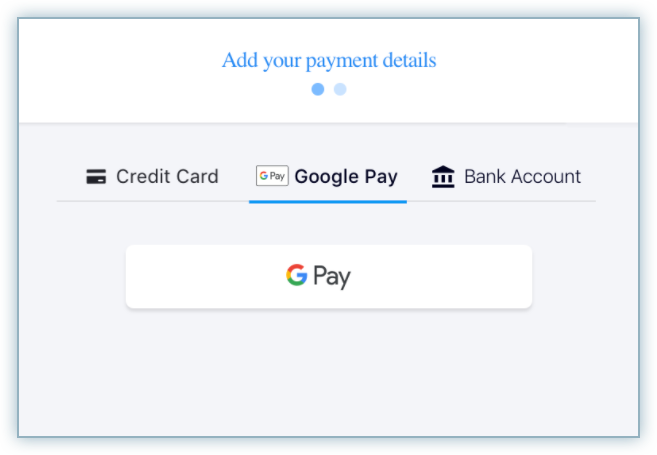
The customer selects Google Pay and clicks the GPay button during checkout. The customer is prompted to log in to their Google Account.
-
On successfully logging in, the cards available for the account are displayed. The customer can select an existing card or add a new card and make the payment.
-
Once the payment is made, the customer is redirected to Chargebee.
-
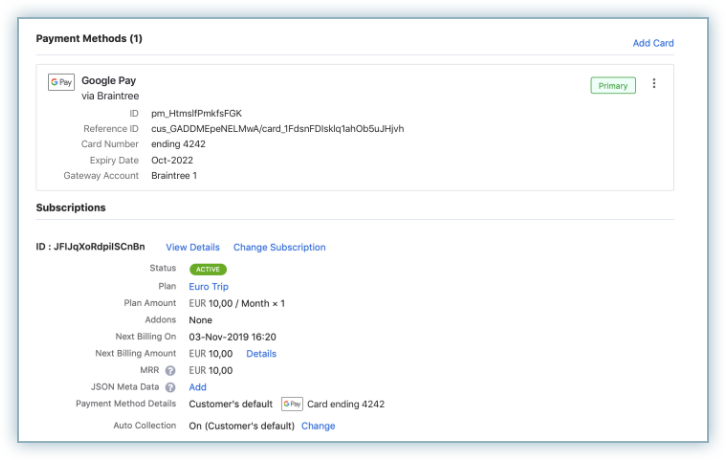
On completing the checkout, the payment method is linked to the customer. Recurring payments will happen using the selected card in GPay.
Venmo
Venmo is a peer-to-peer (P2P) payment solution headquartered in the United States that offers a user-friendly app for effortless and swift money transfers between users. Renowned for its widespread popularity, Venmo is one of the leading payment options in the United States of America.
Currently, Chargebee supports Venmo via Braintre.
PayPal
PayPal is a digital wallet service that allows customers to use their PayPal account to make online transactions. Customers can securely store their credit or debit cards within their PayPal account, which can be used later to make payments.
Currently, Chargebee supports the wallet service by:
Was this article helpful?