Product Updates
Payment Methods
Payment Gateways and Configuration
- Payment Gateways Overview
- Chargebee Test Gateway
- Global Payments
- QuickBooks Payments
- Bank of America
- Solidgate
- Pay.com
- EBANX
- BluePay
- Sage Pay
- Paymill
- Bambora (formerly Beanstream)
- E-xact Direct Integration
- Orbital (Chase Paymentech)
- Pin Payments
- Moneris
- Elavon
- Network Merchants Incorporated (NMI)
- eWay Rapid
- dLocal
- Ecentric
- Windcave
- Metrics Global
- Nuvei
- Paystack
- Articles and FAQ
Level 2/3 Data Support
Advanced Routing
Dunning
Offline Checkout
Transaction Sync & Invoice Mapping
Fraud Management
Error Handling
Payment Lifecycle Logs
Others
- Reach (Merchant of Record)
- Payment Verification
- Bulk Deletion of Payment Methods
- Custom Payment Methods
- Payment Initiator Parameter
- PSD2 and Strong Customer Authentication
- RBI e-Mandate
- RBI Tokenization Regulations
- Transaction Descriptors
- Payment Preferences
- Visa Trial Rules
- Mastercard Trial Rules
- Co-badged Card Compliance
- Articles and FAQ
Apple Pay via Checkout.com
Introduction
Checkout.com is a leading single payment platform to accept payments through multiple payment methods, on any device that supports Apple Pay. Learn more.
You can configure your Chargebee site to accept Apple Pay using your Checkout.com account. Apple Pay via Checkout.com is supported by Chargebee's API, hosted pages, and Chargebee JS.
- Apple Pay via Checkout.com is available for both ABC and NAS platform users.
- Apple Pay in Chargebee can be enabled for only one payment gateway at a time. Make sure you disable it from any other gateway to enable it for your desired gateway.
Prerequisites
- Ensure that you've completed the Checkout.com Apple Pay setup prerequisites before integrating Apple Pay.
Configuring Apple Pay
Configure your Checkout.com Payment Gateway. If already configured, move to the next step.
Follow these steps to configure your Chargebee account to accept Apple Pay payments via Checkout.com:
- Click Settings > Configure Chargebee > Payment Gateway > Checkout.com.
- Enable Apple Pay.
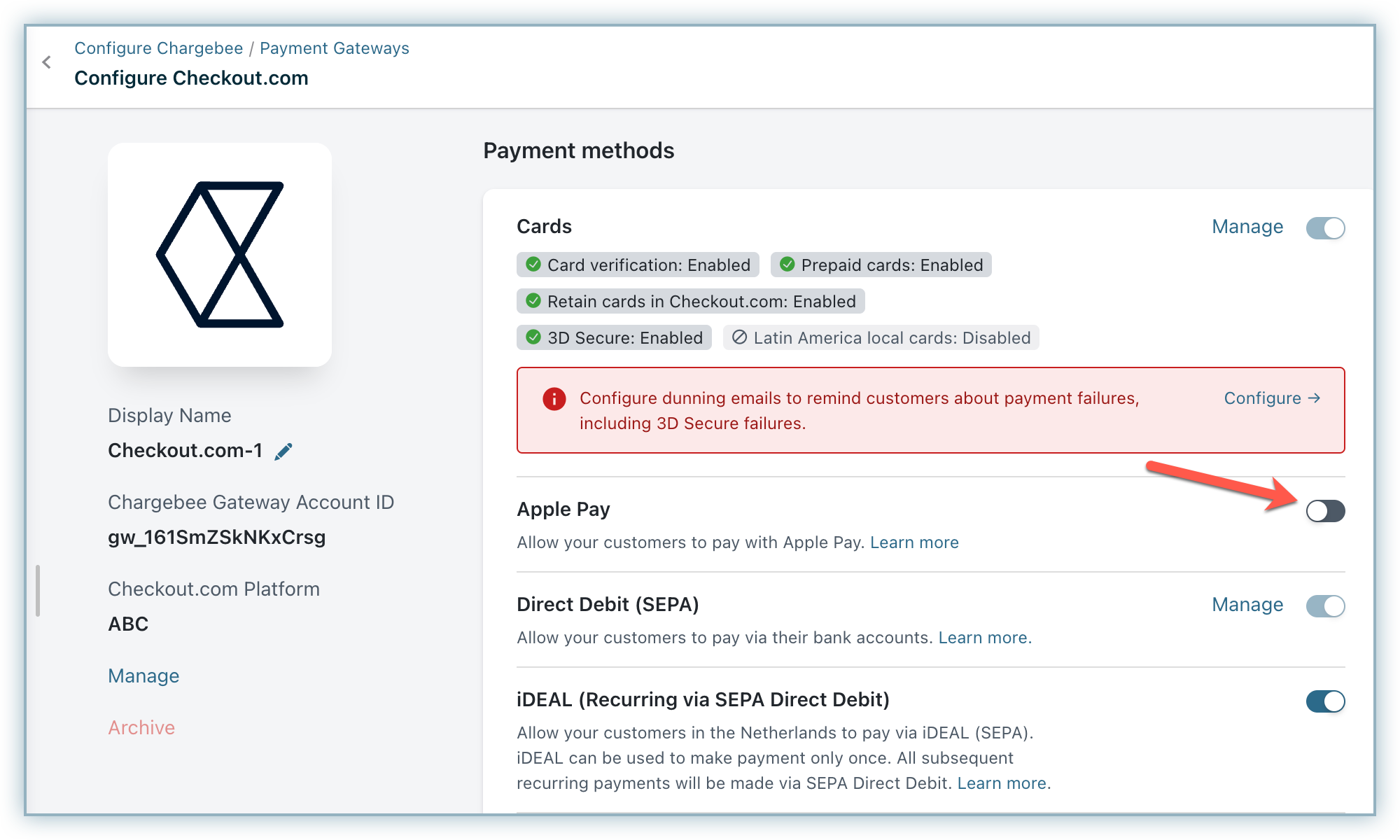
- Enter your Business Name.
- Enter your Merchant ID. Learn how to create or retrieve your Merchant ID.
- Enter the Merchant Country Code. This is the code of the country or region where the payment will be processed.
- Add your Merchant Identity Certificate and Merchant Identity Key. Learn how to create or retrieve these.
- Add your Domain Association File. Learn how to get this file.
- Choose one or multiple options—Shipping Address, Billing Address, Email, or Phone—if you want to collect this information mandatorily from customers.
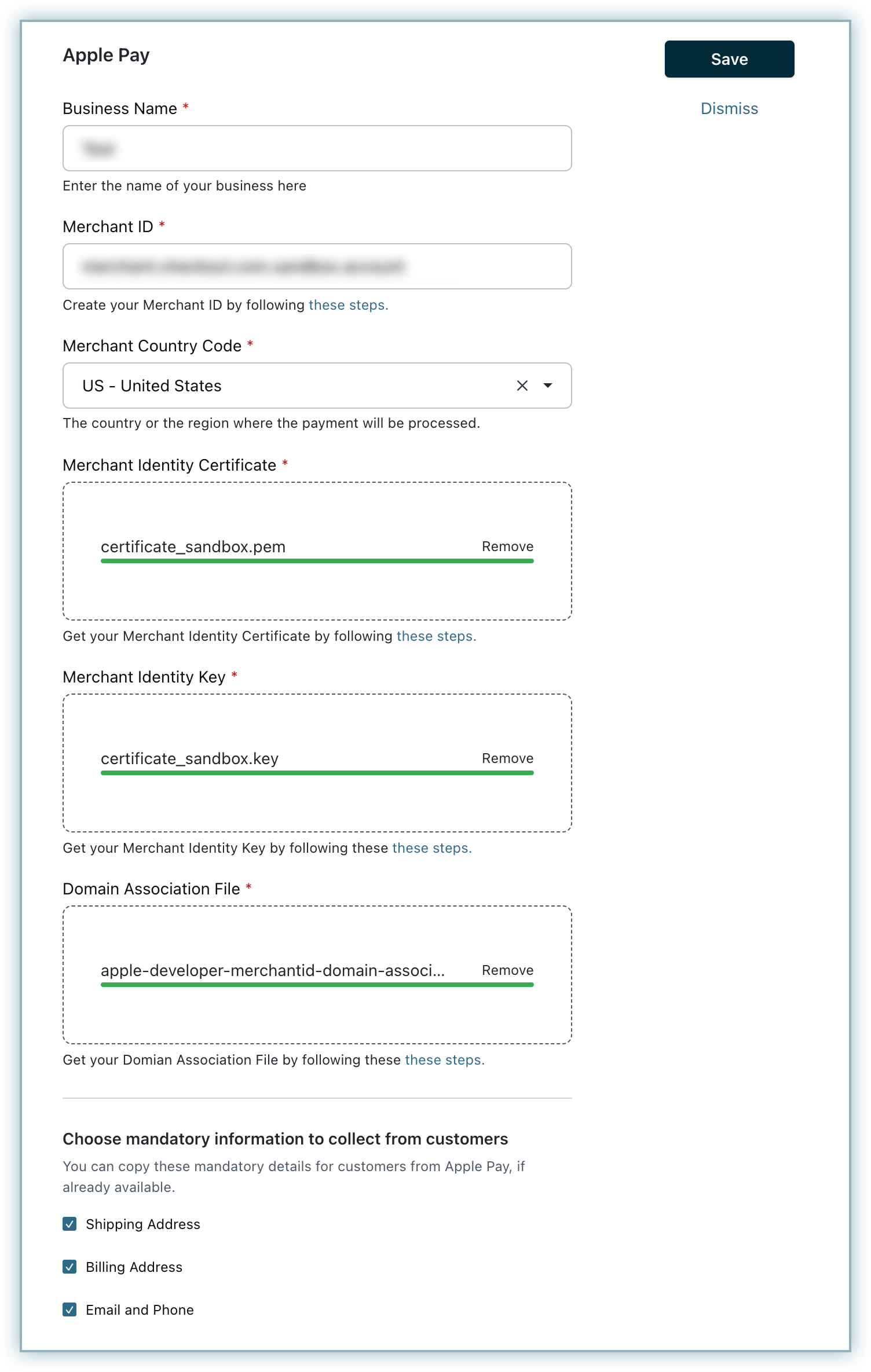
- Click Save to complete the configuration.
- Upload Apple Pay Payment Processing Certificate by following these steps: a. Generate a Certificate Signing Request (CSR). Learn more b. Create an Apple Pay Payment Processing Certificate. Learn more c. Upload the signed Apple Pay Payment Processing Certificate. Learn more
Smart Routing
Configure Smart Routing settings to enable Checkout.com as your preferred gateway with Apple Pay.
The domain validation requirements of Apple Pay restrict the configuration to only one payment gateway that can actively support Apple Pay at a time. Therefore, the option to enable Apple Pay via other payment gateways such as Stripe or Braintree must be disabled.
Frequently asked questions (FAQ)
1. Why is Apple Pay not available as a payment option if I have integrated Chargebee Checkout using the Drop-in Script?
Apple Pay is not supported with the Chargebee Drop-in Script because it uses iframes. Instead, Apple Pay is available only when using Chargebee Checkout via Checkout URL or API-based integration, which opens the checkout page in a separate tab or browser window.
Additionally, Apple Pay works only on iOS devices or when using the Safari browser on macOS. Ensure you are using one of these options during checkout. Apple Pay will not be available if you use a non-iOS device or a different browser.
Articles & FAQs
Was this article helpful?