Product Updates
Payment Methods
Payment Gateways and Configuration
- Payment Gateways Overview
- Chargebee Test Gateway
- Global Payments
- QuickBooks Payments
- Bank of America
- Solidgate
- Pay.com
- EBANX
- BluePay
- Sage Pay
- Paymill
- Bambora (formerly Beanstream)
- E-xact Direct Integration
- Orbital (Chase Paymentech)
- Pin Payments
- Moneris
- Elavon
- Network Merchants Incorporated (NMI)
- eWay Rapid
- dLocal
- Ecentric
- Windcave
- Metrics Global
- Nuvei
- Paystack
- Articles and FAQ
Level 2/3 Data Support
Advanced Routing
Dunning
Offline Checkout
Transaction Sync & Invoice Mapping
Fraud Management
Error Handling
Payment Lifecycle Logs
Others
- Reach (Merchant of Record)
- Payment Verification
- Bulk Deletion of Payment Methods
- Custom Payment Methods
- Payment Initiator Parameter
- PSD2 and Strong Customer Authentication
- RBI e-Mandate
- RBI Tokenization Regulations
- Transaction Descriptors
- Payment Preferences
- Visa Trial Rules
- Mastercard Trial Rules
- Co-badged Card Compliance
- Articles and FAQ
Google Pay via Braintree
GPay allows customers to make payments using its payment method vault. GPay via Braintree integration enables users to securely pay using any card (credit or debit) associated with their Google account. Businesses using Braintree can accept GPay from customers in the countries mentioned here.
Read more about GPay.
- GPay allows you to store payment method information in the cloud and on Android devices. Cards that are stored in the Google Account (cloud) are only considered for this integration.
- You can use all live cards and the test cards mentioned in this document to test the setup. Google ensures that no actual transaction takes place from the live card when using Google's test environment.
Configuring GPay via Braintree
To configure GPay via Braintree in Chargebee, follow these steps:
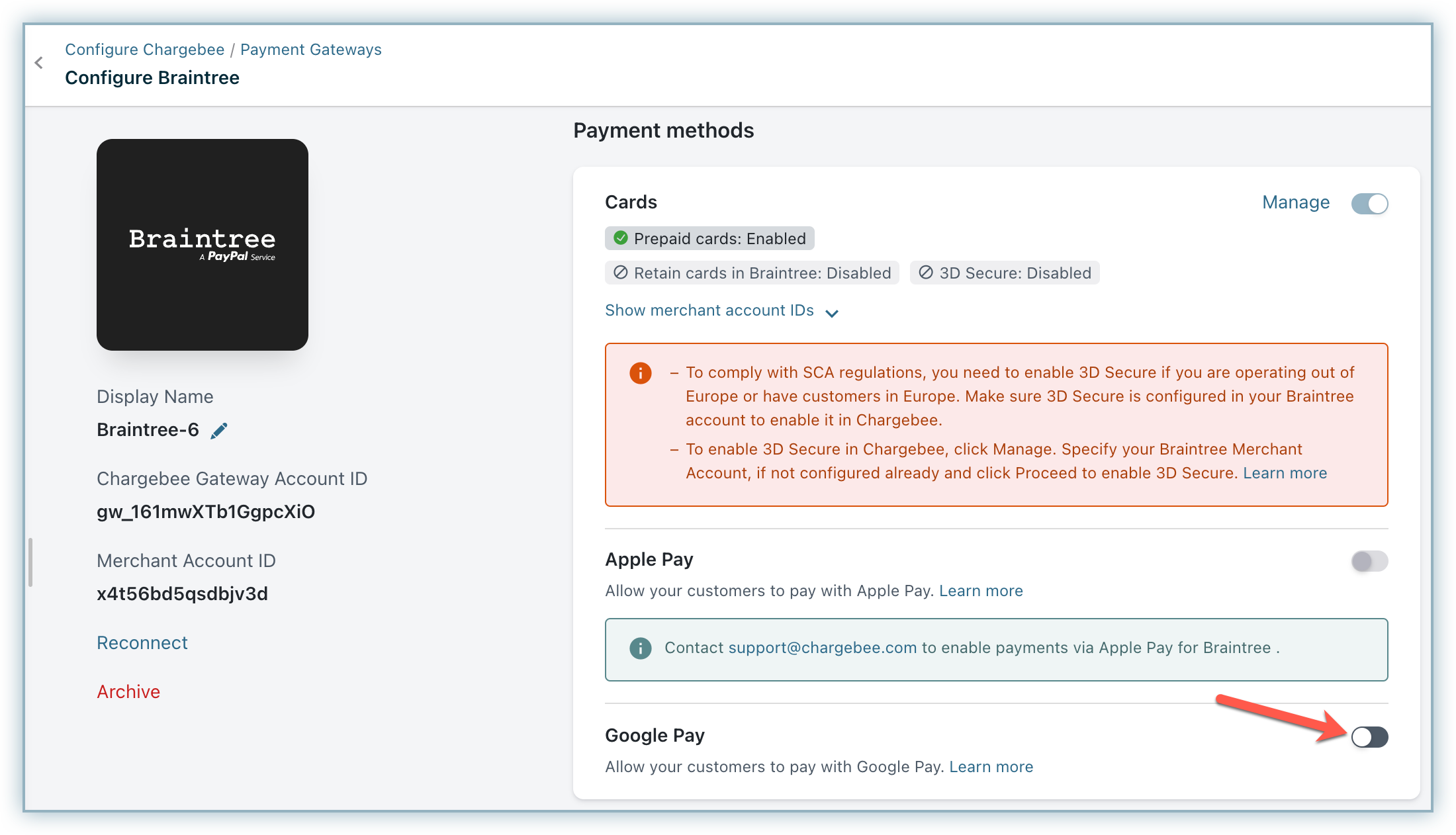
- Configure your Braintree Gateway in Chargebee. If you have already configured it, click Settings > Configure payment gateway > Braintree.
- Enable GPay.
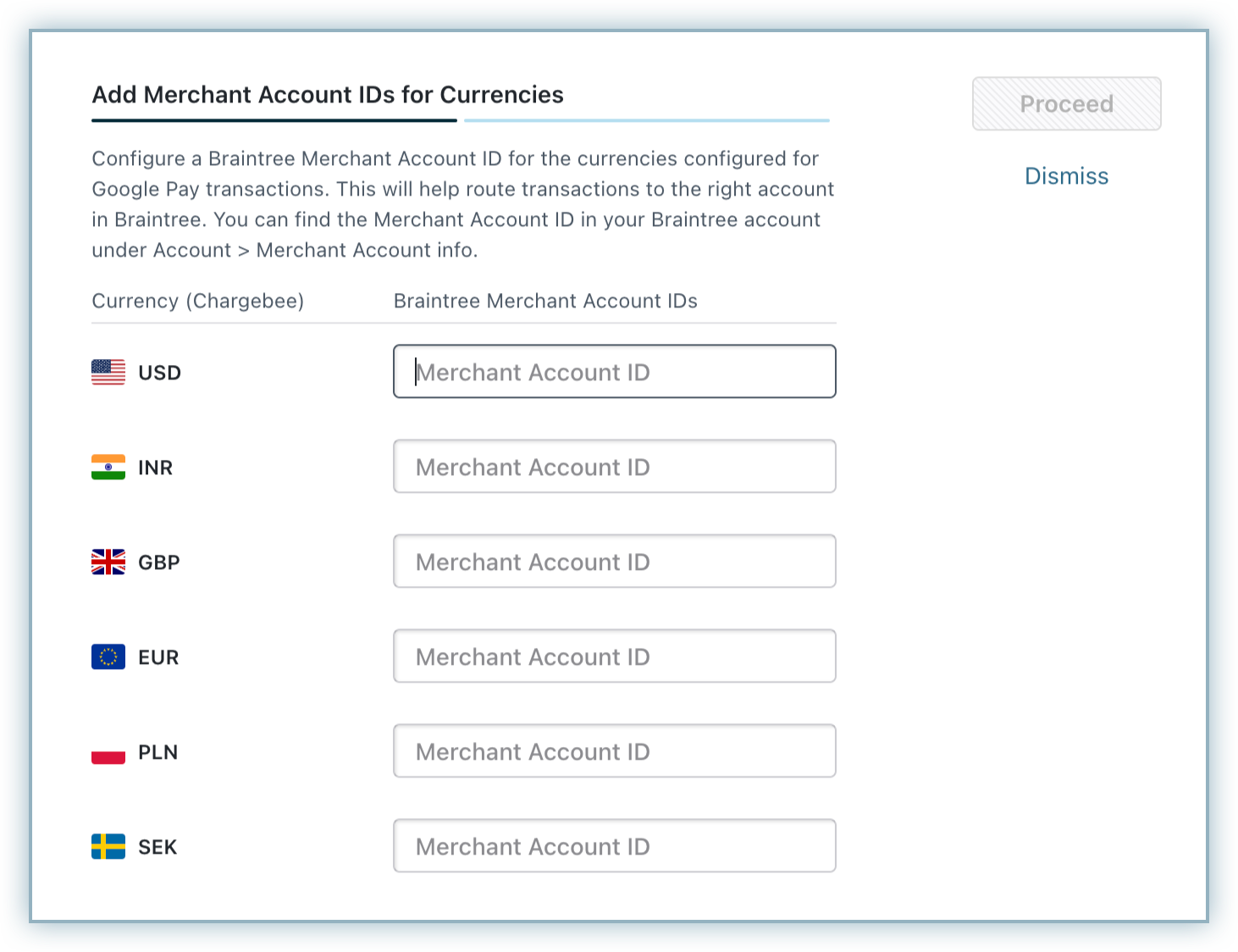
- The merchant account IDs for the currencies that you have configured in Braintree are displayed. Click Proceed.
- Enter the Google Merchant Account ID and click Save. Learn more about Google Merchant account ID.
Payment workflow
The customer selects GPay during checkout.

The customer is prompted to log in to their Google Account. On successfully logging in, the cards available for the account are displayed. The customer can select an existing card or add a new card and make the payment.
Once the payment is made, the customer is redirected to Chargebee.
On completing the checkout, the payment method is linked to the customer. Recurring payments will happen using the selected card in GPay.

Articles & FAQs
Was this article helpful?