Product Updates
Getting Started
- Overview
- Chargebee Billing Data Centers
- Object Relationship Model
- Chargebee Tech Glossary
- Articles and FAQ
Implementing Chargebee
AI in Chargebee
Developer Resources
Product Catalog
Subscriptions
Customers
Entitlements
Usage Based Billing
Chargebee CPQ
Invoices, Credit Notes, and Quotes
Taxes
Hosted Capabilities
- Overview
- Payment Components
- Managing Payments with Chargebee.js
- Mobile-Optimized Hosted Pages
- Articles and FAQ
Site Configuration
- Mandatory Fields
- File Attachments & Comments
- Advanced Filter Options
- Multi-decimal Support
- Configuring Reason Codes
- API Keys
- Time Zone
- Time Machine
- Transfer Configurations
- Articles and FAQ
Multi Business Entity
Mobile Subscriptions
Reports and Analytics
Integrations
Data Privacy & Security
- Two Factor Authentication
- SAML Single Sign-On
- System for Cross-Domain Identity Management (SCIM)
- EU-GDPR
- Consent Management
- Personal Data Management
- Compliance Certificates
- HIPAA Guidelines
- PCI Recommendations and Integration Types
- Articles and FAQ
Data Operations
Chargebee MCP Server
The Model Context Protocol (MCP) is a standardized mechanism that connects large language models (LLMs) to external systems through structured, context-aware communication.
The Chargebee MCP Agent Server extends this protocol with streamable HTTP connections, enabling real-time interaction between Chargebee Agents and clients such as AI-powered code editors like Cursor and Windsurf, or general-purpose tools like Claude Desktop, along with other compatible IDEs and orchestration systems.
This version is fully hosted, agent-based, and designed for low-latency streaming over secure HTTP endpoints.
Architecture and Components
1. Agent-based Design
Each Chargebee Agent functions as a dedicated MCP endpoint exposing tools and skills specific to a particular use case (e.g., data lookup, onboarding, or documentation lookup).
Every agent is deployed at its own endpoint:
US Datacenter - https://<your-site-id>.mcp.chargebee.com/<agent-name>
EU Datacenter - https://<your-site-id>.mcp.eu.chargebee.com/<agent-name>
AU Datacenter - https://<your-site-id>.mcp.au.chargebee.com/<agent-name>
Make sure to use the correct domain based on the region where your Chargebee site is hosted.
2. Streamable HTTP Transport
The Chargebee MCP Agent Server exclusively supports Streamable HTTP transport, ensuring standardized and real-time communication through modern, event-driven semantics compatible with MCP clients. The minimum supported protocol version is 2025-06-18.
3. Authentication
All agent servers (except the public Knowledge Base Agent) require authentication via an API key:
Authorization: Bearer <your-api-key>
API keys are generated from the Agent Configuration section in your Chargebee dashboard.
OAuth 2.1–based authentication support will be added soon.
Supported Agents
| Agent | Description | Access |
|---|---|---|
| Knowledge Base Agent | Provides detailed explanations of Chargebee features, API endpoints, and documentation. | Public |
| Data Lookup Agent | Retrieves customer, subscription, invoice, and credit note information from your Chargebee site. | Requires API key |
| Onboarding Agent | Automates setup for product catalogs, pricing models, and customer data in Test Sites. | Requires API key |
Each agent exposes its own tools and skills for MCP clients.
Example: Integrating Knowledge Base Agent
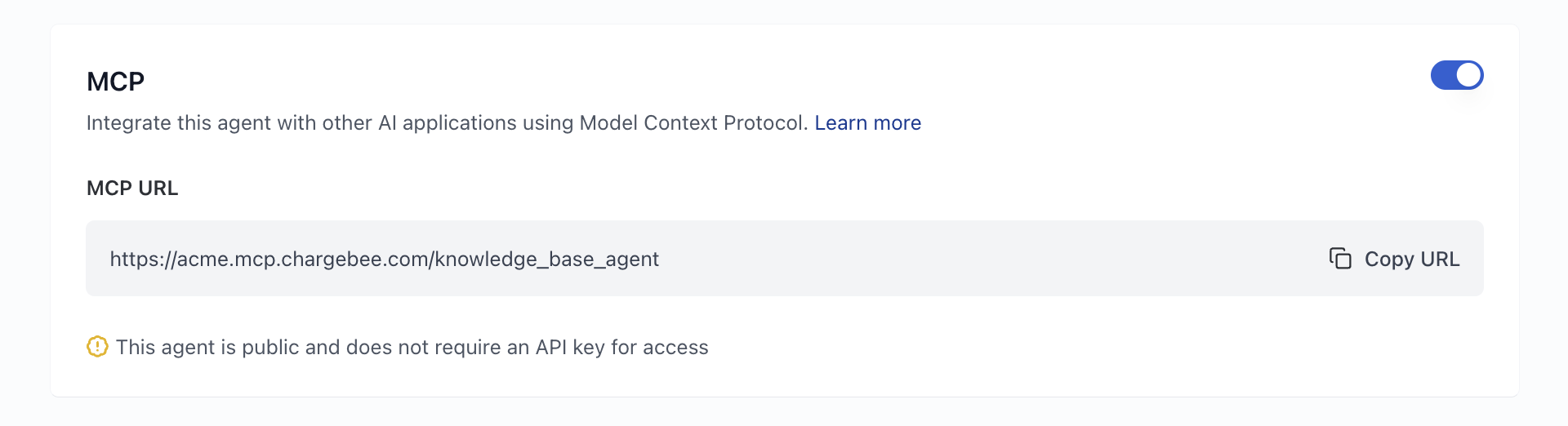
Remote MCP URL
<your-knowledge-base-agent-mcp-url>
The MCP URL is available in the MCP section of your Knowledge Base Agent settings.
Cursor
To add this server to Cursor IDE:
- Navigate to Cursor Settings > MCP.
- Click + New MCP Server.
- Add the following configuration to your global
.cursor/mcp.jsonfile:
{
  "mcpServers": {
    "chargebee-knowledge-base": {
      "url": "<your-knowledge-base-agent-mcp-url>"
    }
  }
}
Refer to the Cursor documentation for additional details
Claude Code
Use the following command to add Chargebee Agent MCP Server
claude mcp add --transport http chargebee-knowledge-base <your-knowledge-base-agent-mcp-url>
Example: Integrating Data Lookup Agent
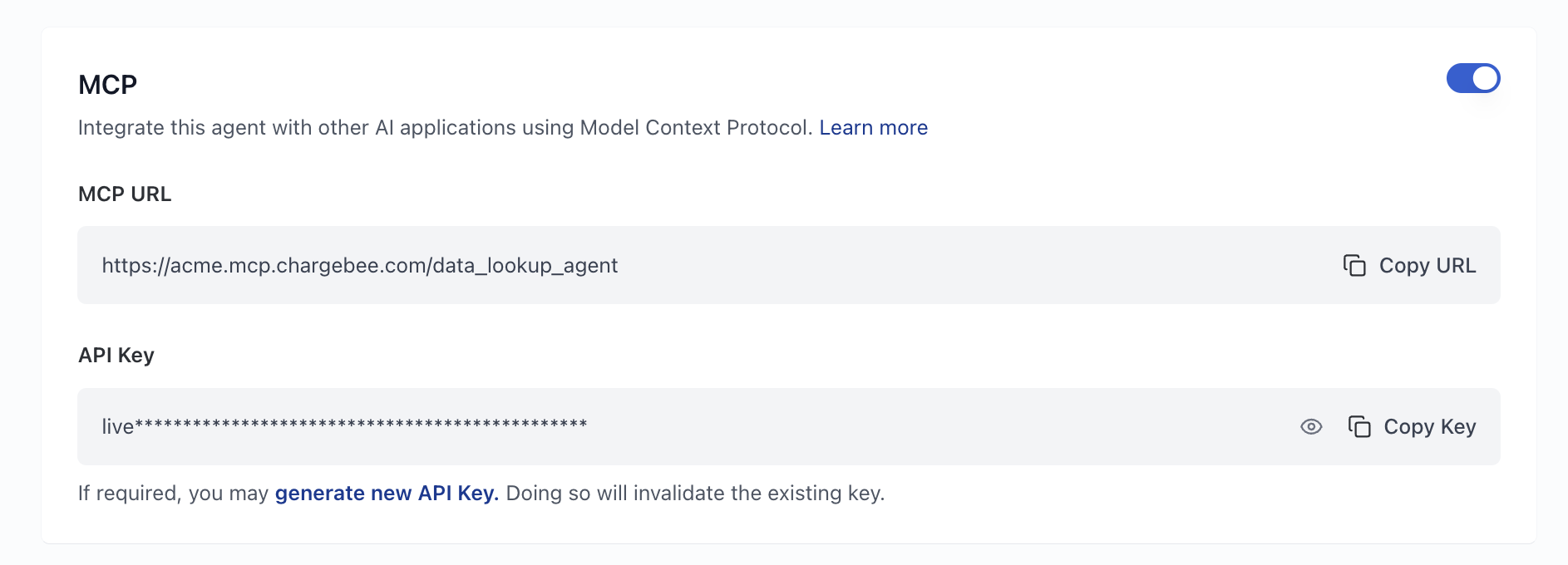
Remote MCP URL
<your-data-lookup-agent-mcp-url>
The MCP URL is available in the MCP section of your Data Lookup Agent settings.
Cursor
To add this server to Cursor IDE:
- Navigate to Cursor Settings > MCP
- Click + New MCP Server
- Add the following configuration to your global
.cursor/mcp.jsonfile:
{
  "mcpServers": {
    "chargebee-data-lookup": {
      "url": "<your-data-lookup-agent-mcp-url>",
      "headers": {
        "Authorization": "Bearer <your-api-key>"
      }
    }
  }
}
Refer to the Cursor documentation for additional details.
Claude Code
Use the following command to add Chargebee Agent MCP Server
claude mcp add --transport http chargebee-data-lookup <your-data-lookup-agent-mcp-url> --header "Authorization: Bearer <your-api-key>"
Was this article helpful?