New in Chargebee: Explore Reveal and understand your payment performance end-to-end.Try Now
Docschargebeedocs
HomeBillingPaymentsRevRecGrowthReveal
Support

Product Updates


  • Release Notes

Getting Started


  • Overview
  • Chargebee Billing Data Centers
  • Object Relationship Model
  • Understanding Sites
  • Chargebee Tech Glossary
  • Articles and FAQ

Implementing Chargebee


  • Implementation Guide
  • Go-live Checklist
  • Articles and FAQ

AI in Chargebee


  • Chargebee Agents
  • Chargebee Copilot
  • Chargebee MCP Server (Model Context Protocol)

Developer Resources


  • Developer Resources Overview
  • Articles and FAQ

Product Catalog


  • Product Catalog Overview
  • Coupons
  • Articles and FAQ

Subscriptions


  • Working with Subscriptions
  • Billing
  • Orders
  • Articles and FAQ

Customers


  • Managing Customers
  • Account Hierarchy
  • Email Notifications
  • Branding
  • Configure Multiple Languages
  • Articles and FAQ

Entitlements


  • Entitlements Overview
  • Features Overview
  • Feature Management
  • Managing Product Entitlements
  • Subscription Entitlements
  • Customer Entitlements
  • Grandfathering Entitlements
  • Articles and FAQ

Usage Based Billing


  • Understanding Usages
  • Setting up Usage Based Billing
  • Usage Alerts
  • Metered Billing
  • Articles and FAQ

Chargebee CPQ


  • Chargebee CPQ
  • Chargebee CPQ for Salesforce
  • Chargebee CPQ for HubSpot

Invoices, Credit Notes, and Quotes


  • Invoices
  • Credit Notes
  • Quotes [Legacy]
  • Transactions
  • Articles and FAQ

Taxes


  • Overview
  • Configuring Taxes
  • Country-specific Taxes
  • Articles and FAQ

Hosted Capabilities


  • Overview
  • Hosted Checkout
  • Hosted Self-Serve Portal
  • Hosted Pages Features
  • Additional Hosted Pages
  • Payment Components
  • Pricing Table
  • Managing Payments with Chargebee.js
  • Mobile-Optimized Hosted Pages
  • Articles and FAQ

Site Configuration


  • Users & Roles
  • Custom Fields & Metadata
  • Approvals
  • Mandatory Fields
  • File Attachments & Comments
  • Advanced Filter Options
  • Multicurrency Pricing
  • Multi-decimal Support
  • Configuring Reason Codes
  • Events and Webhooks
  • API Keys
  • Time Zone
  • Time Machine
  • Transfer Configurations
  • Articles and FAQ

Multi Business Entity


  • Multi Business Entity Overview
  • Customer Transfer Overview
  • Articles and FAQ

Mobile Subscriptions


  • Overview
  • Omnichannel Subscriptions
  • Omnichannel One-Time Orders
  • Mobile Subscriptions (Legacy)

Reports and Analytics


  • RevenueStory
  • Home Dashboard
  • Frequently Asked Questions
  • FAQs for Classic Reports Sunset
  • Articles and FAQ

Integrations


  • Sales
  • Customer Support and Success
  • Finance
  • Tax
  • Marketing
  • Stitch
  • Collaboration
  • Contract Management
  • Ecommerce Management
  • Articles and FAQ

Data Privacy & Security


  • Two Factor Authentication
  • SAML Single Sign-On
  • System for Cross-Domain Identity Management (SCIM)
  • EU-GDPR
  • Consent Management
  • Personal Data Management
  • Compliance Certificates
  • HIPAA Guidelines
  • PCI Recommendations and Integration Types
  • Articles and FAQ

Data Operations


  • Bulk Operations
  • Migration
  • Articles and FAQ
  1. Billing
  2. Getting Started
  3. Object Relationship Model
  1. Billing
  2. Getting Started
  3. Object Relationship Model

Object Relationship Model

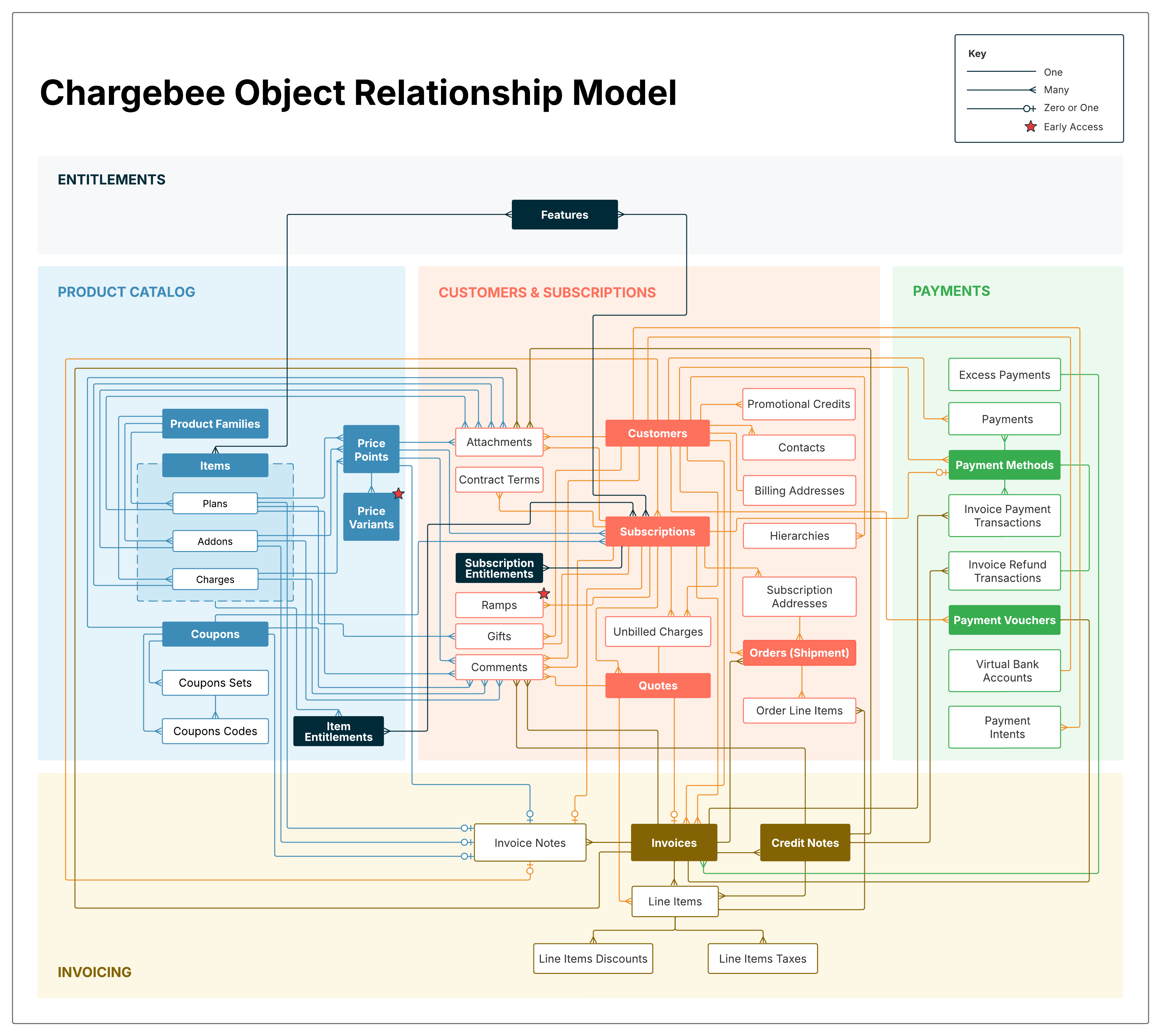
Chargebee automates the recurring billing and subscription workflow for your business with a closely coupled system. The following diagram depicts Chargebee's Object Relationship model. The purpose of this diagram is for you to identify the key data objects in Chargebee, and understand how they are linked and interact with each other within Chargebee.

Based on their functionality, the objects are placed under four key sections that are Product Catalog, Customers & Subscriptions, Invoicing, and Payments. These objects interact to help automate the subscription billing and revenue operations for your business.

The objects are linked using crow's foot notation to describe the type of relationship between them.

Click the image for a full-screen view.
image

Product Catalog

Product Families, Items(Plans, Addons, Charges), Coupons, and Coupon Sets form Chargebee's Product Catalog. These objects help you define your products or services, along with their pricing and recurring/non-recurring billing configuration. Learn more about the product catalog in Chargebee.

Customers and Subscriptions

Subscriptions are created when your customers sign-up for your plans and addons. This section includes the key objects that can be tracked for your customers and subscriptions along with Quotes and Orders that can be created for them. Learn more about customers and subscriptions in Chargebee.

Invoicing

This section displays the objects included in the Invoices and Credit Notes modules and how they relate to the other objects in Chargebee. Learn more about invoices in Chargebee.

Payments

This section displays payment related objects and how they related to the customers, subscriptions, and invoicing objects. Learn more about in Chargebee.

Was this article helpful?