Salesforce (v1.37)
Important This page pertains to v1.37 of the Salesforce integration. If you last installed the Salesforce integration before 6th Jan 2020, it is likely that you are using a deprecated version of the integration (package v1.31 and below) that performs a contact-based mapping. To migrate to the current version, contact support.
Note
- Supported Salesforce versions: Salesforce Enterprise Edition and above.
- Visit the Plans and Pricing page to see which plans in Chargebee are supported.
- Both Salesforce Classic and Lightning UI are supported.
What's new in Salesforce integration
Stay informed about the latest features and enhancements by visiting the Chargebee Release Notes for comprehensive updates on Salesforce integrations. View all the Release Notes.
Chargebee provides a highly customizable integration with Salesforce. By maintaining a one-to-one relationship between Chargebee customer records and Salesforce accounts, the integration keeps both the systems up-to-date. Chargebee subscriptions can be directly created and managed from Salesforce.
Based on the configuration, the integration creates/updates records within the following standard objects in Salesforce:
- Account
- Contact
- Lead
- Opportunity
- Opportunity Product
- Product
- Price Book
- Price Book Entry
Additionally, custom objects are also created and updated with Chargebee data.
See also
Object mapping between Chargebee and Salesforce.
Key Features
- Important Chargebee operations that support a sales-driven workflow can be performed without leaving Salesforce.
- Customer and subscription data is synced into Salesforce, aiding a direct-purchase model.
- Flexible integration, with a host of customizations available to suit your business workflow.
- Multiple Chargebee sites can be connected to a single Salesforce instance.
- Salesforce Person accounts are supported.
Sync Overview
- Plans and addons are synced as product and price book entry records.
- Customer records are mapped in a 1-to-1 manner to account records (person accounts are also supported).
- Leads can be converted if matching accounts are not found.
- Coupons are synced to a custom object.
- If you connect multiple Chargebee sites to Salesforce, a price book is created for every such site.
- Chargebee quotes can be created from within Salesforce and emailed to customers.
- All invoices and credit notes are synced to Salesforce as custom objects.
- Opportunities can be created upon lead conversion.
- Subscriptions are synced to Salesforce as a custom object.
- Opportunities can be mapped and maintained against subscriptions.
Note
Sync Direction The integration syncs information between Chargebee and Salesforce. However, the direction of sync can be customized for each pair of mapped fields.
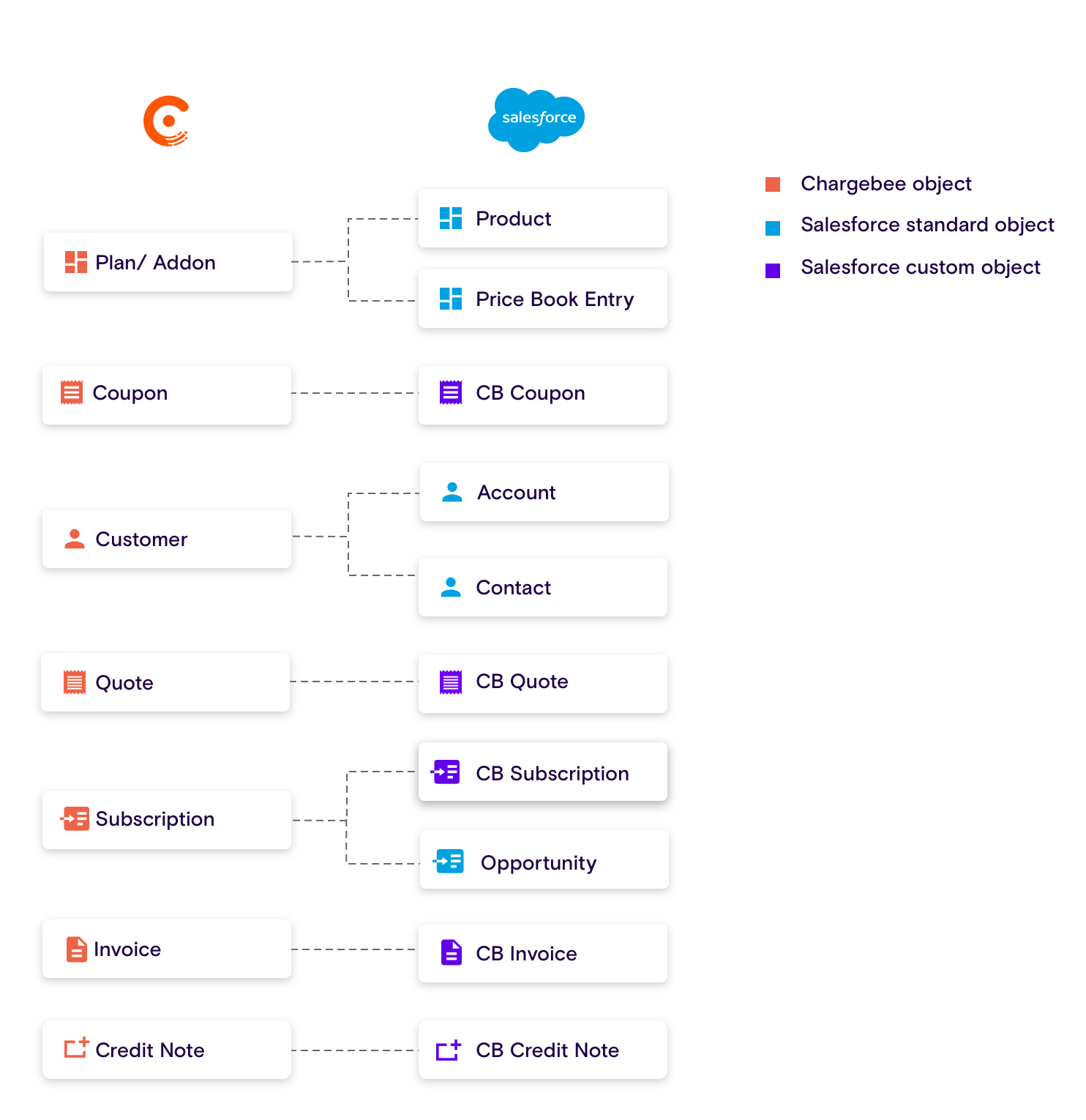
Object Mapping
On a high level, the objects in Chargebee are mapped to those in Salesforce as follows:
See also
Standard object and field mapping between Salesforce and Chargebee.
Setting up the Integration
The Chargebee for Salesforce integration must be setup to match your business workflows:
- The first step is to connect to Salesforce from your Chargebee site and to install the Chargebee for Salesforce package. Read the installation guide.
- The next step is to ensure that the integration behavior is configured to match your Salesforce workflows. The integration guide helps you in this.
Subscription Management
Once the integration is up and running, Chargebee customers and subscriptions can be managed directly from Salesforce. The available options are listed under Chargebee Actions in Salesforce.
See also
Other pages for Salesforce:
Was this article helpful?