How to allow customers to choose a language in checkout and self-service portal
Problem Statement
You have multiple languages configured and want customers to select their preferred language on the checkout or portal page. You need to know how Chargebee identifies customer locale and how to enable language selection.
Solution
Chargebee detects language from the customer's locale (set in the Admin console or chosen in the portal). Each site has a default language used when no locale is set. Multiple languages are available on specific plans. Refer to the plans and pricing page for more details.
You can also send the "locale" parameter along with plan specific hosted page URL so that the hosted pages can be opened in the specific language based on the locale by default.
Example link with the customer[locale] being passed: https://test.chargebee.com/hosted_pages/plans/free?customer[locale]=sv
For more on the localization feature, please check this doc.
For Checkout & Portal
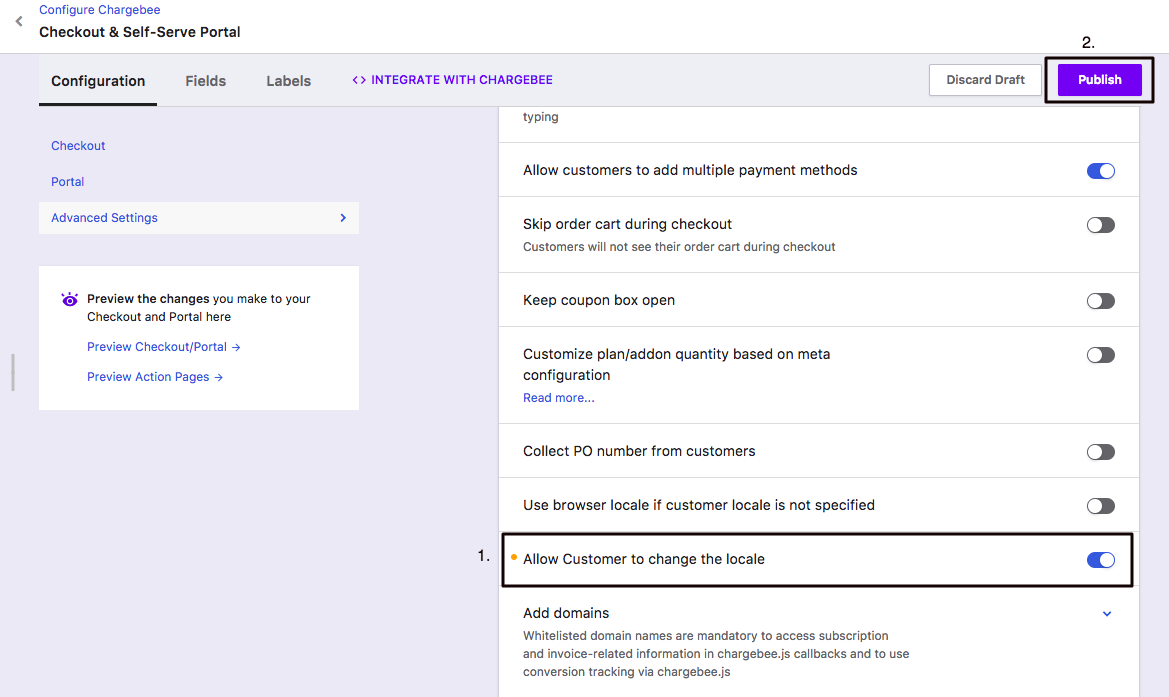
You can enable the "Allow Customer to change the locale" by going to Settings (Left-side panel) >> Configure Chargebee >> Checkout & Self-Serve Portal >> and choosing "Advanced Settings" under the "Configurations" tab.
Related Doc How Languages are set for Customers?
Was this article helpful?